10 Best Things to Know About Nordic King IPTV Services
Published on October 31, 2026 | By Martin M.
When exploring streaming solutions, users often search for reliable information regarding Nordic King IPTV to understand how these services operate across different devices and networks. Nordic IPTV solutions generally provide access to live television channels, international programming, and video-on-demand content via internet protocol networks rather than traditional cable or satellite infrastructure. Understanding the technical requirements, app compatibility, and network prerequisites helps ensure a stable viewing experience.
Table of Contents
Understanding Nordic King IPTV and Compatibility
What is Nordic King IPTV?
Nordic King IPTV refers to a specific subscription-based streaming offering tailored for users seeking Scandinavian and international channels delivered over broadband connections. Unlike traditional broadcast methods, internet protocol television relies on digital data packets transmitted directly to compatible client applications. Subscribers typically receive connection credentials—such as M3U playlists, Xtream Codes API details, or direct portal links—which must be configured inside a dedicated media player app. Evaluating these technical foundations is essential for achieving reliable playback without frequent buffering or connection drops.
Supported Devices and App Options
Achieving optimal performance with Nordic IPTV services depends heavily on using a capable streaming device and a reputable media player application. Modern smart TVs, dedicated streaming boxes, and mobile platforms support various third-party applications capable of parsing IPTV playlists. Popular third-party applications include TiviMate, IPTV Smarters Pro, and VLC Media Player for desktop environments. According to Amazon Fire TV Device Specifications, hardware decoding capabilities vary significantly between streaming sticks and high-end media hubs, directly impacting how smoothly high-definition streams are rendered.
How to Set Up and Configure Your Streaming App
Essential Configuration Requirements
Before entering connection details into your chosen media player, verify that you have all necessary credentials provided by your service supplier. These typically include a server URL, a username, and a password for Xtream Codes API setups, or a direct web address for M3U playlist downloads. Ensuring accurate entry of these parameters prevents common authentication errors. Additionally, checking your network stability via Microsoft Network Diagnostics Support helps confirm that your local broadband connection meets the minimum throughput required for uninterrupted media streaming.
Step-by-Step Connection Guide
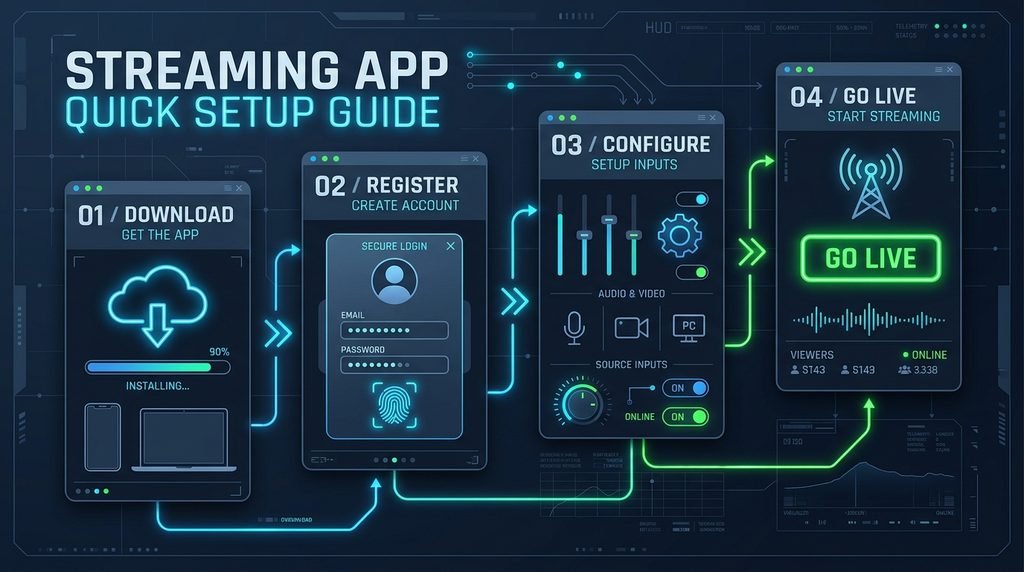
Configuring your application involves a straightforward series of menus within your chosen client software:
Download and install a verified IPTV player—such as TiviMate or IPTV Smarters—from your device’s official app store.
Open the application and select the option to add a new playlist or user profile.
Choose your preferred connection method, such as Xtream Codes API, which is generally less prone to syntax errors than long M3U URLs.
Input your server URL, username, and password carefully, avoiding trailing white spaces.
Save the configuration and allow the application a few moments to synchronize channels and electronic program guide (EPG) data.
Streamlined authentication without manual passwords
Restricted to a single hardware MAC address
MAG boxes, STB emulators
Evaluating Performance and Troubleshooting Issues
Common Streaming Obstacles and Fixes
Users occasionally encounter playback errors, such as infinite loading wheels, missing electronic program guides, or audio-video desynchronization. These issues frequently stem from temporary server congestion or local ISP throttling. When troubleshooting playback performance, consulting broad technology advisories such as those published by CNN Tech News can provide broader context on regional internet infrastructure health and peering bottlenecks that affect international data streams.
Bandwidth and Network Optimization
Maintaining a consistent high-speed internet connection is vital for high-definition and 4K streaming delivery. Wi-Fi signal interference can severely degrade streaming quality, making wired Ethernet connections preferable where hardware permits. Closing background downloads on your home network frees up necessary bandwidth. Furthermore, restarting both your local router and your streaming device clears temporary cache memory and refreshes DNS resolution paths, often instantly resolving stubborn connection timeouts.
Frequently Asked Questions and Next Steps
Essential Legal and Security Considerations
When utilizing third-party IPTV services, evaluating copyright compliance and data privacy is crucial. Users must verify local broadcasting regulations and ensure that their chosen providers operate within legal frameworks established in their respective jurisdictions. Reliable research resources, such as reports from the Federal Communications Commission, offer valuable insights into internet service rules and consumer rights regarding digital media consumption.
Exploring Further Resources
To continue optimizing your streaming setup and finding reliable support, explore additional resources on our website. Review our detailed Pricing Plans, browse our comprehensive Channel List, or check out our Free Trial options to test compatibility before making a long-term commitment. For further assistance, visit our Contact Us page.
Key Takeaway: Proper app selection, stable wired or wireless network conditions, and accurate credential entry are the three most critical pillars for achieving a reliable Nordic IPTV streaming experience.
Next-step block Ready to evaluate compatibility? Visit our Free Trial page to test your device setup, or explore our FAQ for answers to common technical questions.