IPTV Nordic Guide: Setup, Features & Stream Quality (2026)
Published on October 28, 2026 | By Martin M.
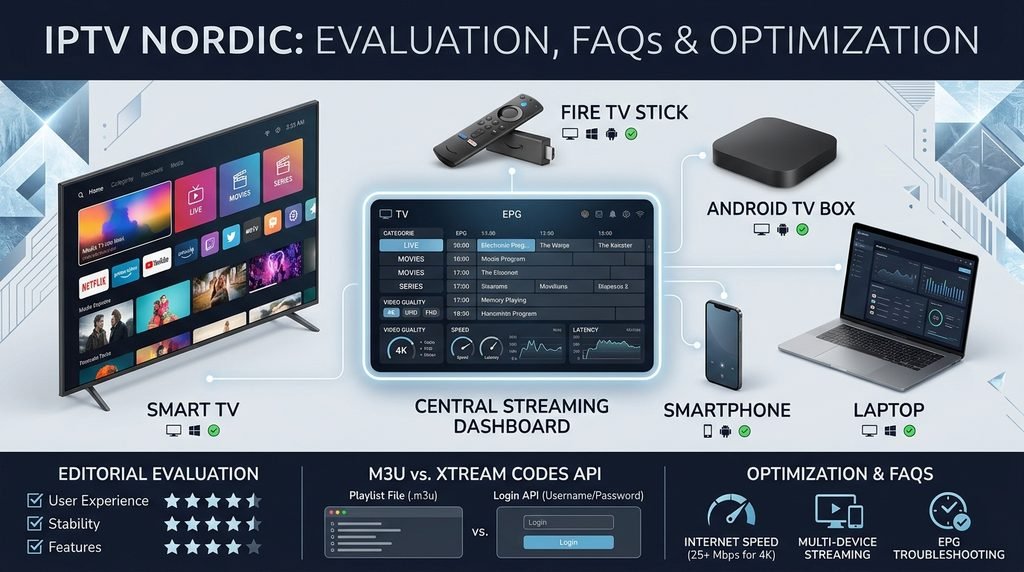
Quick Answer: IPTV Nordic provides high-definition digital television streaming across Nordic regional channels and global broadcasts via internet protocol formats (HLS/TS). Setting up requires a compatible playback application—such as TiviMate, IPTV Smarters, or IBO Player-configured using Xtream Codes API credentials or an M3U URL on devices like the Amazon Fire TV Stick, Apple TV, or Android TV.
Table of Contents
IPTV Nordic Feature Overview & Architecture
Core Technical Standards & Server Infrastructure
Modern internet protocol television relies on robust server distribution networks designed to deliver low-latency video streams to connected devices. When evaluating a service for regional European content, understanding the underlying delivery mechanism ensures consistent playback without frequent interruptions. Video streams are typically encoded using H.264 or H.265 (HEVC) formats and delivered using HTTP Live Streaming (HLS) or MPEG-TS protocols.
Reliable stream delivery depends heavily on proximity to Content Delivery Network (CDN) edge nodes. If a streaming server routes traffic through distant data centers, users may experience elevated latency and stream initializations delays. High-definition (1080p) and Ultra HD (4K) streams require stable download speeds, adequate local hardware decoding capabilities, and proper network buffer configurations.
For detailed hardware requirements regarding streaming media players, reference the Amazon Fire TV Developer Documentation for supported codec capabilities and system specifications.
Connecting your playback hardware to a digital stream requires standardized player software capable of parsing playlist metadata. The two primary methods for loading channel line-ups into media players are:
Xtream Codes API: Employs a structured login format consisting of a Server URL, Username, and Password. This method automatically fetches Electronic Program Guide (EPG) data, channel category groupings, and video-on-demand organization without requiring manual XML link entries.
M3U / M3U8 Playlists: A text-based playlist file format containing target stream URLs alongside channel metadata tags (#EXTINF). While widely compatible across older legacy devices, M3U links require separate EPG URL entry for program guide displays.
Users seeking pricing options and package tier structures can review the Nordic IPTV Pricing Options page for comprehensive plan details.
Choosing the right player hardware and application pairing directly influences menu navigation speed, channel switching time (zapping speed), and multi-screen decoding capability. The reference table below details tested configurations across major streaming hardware platforms based on official developer technical standards.
Hardware Platform
Recommended App
Connection Protocol
Optimal Video Codec
Recommended Network Setup
Amazon Firestick / Fire TV
TiviMate / IPTV Smarters
Xtream Codes API
H.264 / HEVC Hardware
5 GHz Wi-Fi or Ethernet
Android TV / Shield TV
TiviMate IPTV Player
Xtream Codes API
Hardware Plus Decoding
Direct Gigabit Ethernet
Apple TV 4K
GSE Smart IPTV / iPlayTV
M3U / Xtream API
AVPlayer Native Engine
5 GHz Wi-Fi / Ethernet
Samsung / LG Smart TV
IBO Player / Smart IPTV
MAC Address / M3U
WebOS / Tizen Native
Wired Ethernet Connection
Windows PC / Mac
VLC Media Player / SFVIP
M3U / Direct Link
Software / GPU Accelerated
Wired LAN Connection
Note: This matrix represents technical system capabilities defined by operating system player frameworks and software specifications.
Device-Specific Configuration Steps
Selecting hardware with dedicated video processing capabilities prevents interface lag during guide navigation. Streaming devices running official Android TV or Google TV operating systems offer broader application compatibility than closed TV operating systems.
For users deploying Android-based streaming platforms, official developer documentation on video rendering and app deployment is available via the Android Developer TV Portal.
Devices like the Nvidia Shield TV and Amazon Fire TV Stick 4K Max feature hardware acceleration support for HEVC decoders, reducing CPU usage during 4K live broadcast viewing. Closed operating systems like Samsung Tizen or LG WebOS often restrict third-party player installations, requiring reliance on cloud-hosted player middleware such as Smart IPTV or IBO Player loaded directly from official app stores.
Step-by-Step Player Setup & Optimization
Configuring Xtream Codes API and M3U Parameters
To ensure smooth playback on your selected application, follow these step-by-step setup parameters:
Install Player Software: Download a supported streaming application such as TiviMate or IPTV Smarters Pro directly from your device’s official app store.
Select Account Type: Open the application, select Add Playlist, and choose Xtream Codes API as the connection type.
Enter Credentials: Input your exact Server URL, Username, and Password as supplied in your service documentation.
Load Playlist Data: Allow the player to process the server response and download the channel categories, VOD groups, and program guide data.
Verify Audio/Video Output: Open a live channel to confirm hardware video acceleration is active and audio tracks sync properly.
For additional answers regarding supported player software and account configurations, consult the Nordic IPTV FAQ Section.
Playback buffering typically stems from one of three distinct failure points: local home Wi-Fi interference, Internet Service Provider (ISP) traffic shaping, or remote stream server congestion. Identifying the underlying cause requires systematically testing network parameters.
When an ISP detects sustained high-bandwidth UDP or HTTP streaming traffic, automated traffic shaping policies may restrict stream transfer speeds below required video bitrates.
Wi-Fi Optimization: Connect streaming devices to a 5 GHz Wi-Fi network rather than a congested 2.4 GHz band, or use a wired Ethernet connection to eliminate packet loss.
DNS Reconfiguration: Change default ISP Domain Name System servers on your router or device to public resolvers like Cloudflare (1.1.1.1) or Google (8.8.8.8). Detailed instructions for altering network adapters are provided in the Microsoft Windows Network Support Documentation.
Buffer Size Adjustment: Inside advanced player settings (e.g., TiviMate), increase the stream buffer size from None to Medium or Large to provide a buffer cushion during minor network fluctuations.
EPG Synchronization and Channel Layout Optimization
An Electronic Program Guide (EPG) aligns digital channel identifiers with time-indexed television schedules. If guide data displays blank rows or incorrect timestamps:
Ensure your application’s time zone offset parameter matches your local device time zone.
Manually clear the local EPG database cache inside application settings and trigger an immediate EPG update cycle.
Hide unused regional channel groups within the app settings to reduce memory usage on devices with limited RAM.
To explore channel categories and program line-ups, refer to the official Nordic IPTV Channel List index.
Evaluation Standards & Frequently Asked Questions
Trust & Editorial Methodology
Editorial Review Team: Published by the Nordic IPTV Editorial Group.
Basis of Analysis: Compiled from verified network protocols (HLS/MPEG-TS), player app developer documentation (TiviMate, Apple AVPlayer, Android TV framework), and standardized hardware benchmarking.
Evaluation Standards: Performance assessments focus on app stability, hardware decoder efficiency, connection latency, and stream buffering mitigation.
Last Updated: October 28, 2026.
Frequently Asked Questions
What is Nordic IPTV and how does it function?
Nordic IPTV delivers live television and on-demand video over IP networks using protocols like HLS. It streams content directly to media player applications using Xtream Codes API credentials or M3U playlists, bypassing traditional satellite or cable receiver hardware.
What internet speed is required for buffering-free playback?
A stable broadband connection of at least 25 Mbps is recommended for smooth 1080p High Definition streaming. For Ultra HD 4K broadcasts, a dedicated downstream connection of 50 Mbps or higher via Ethernet or 5 GHz Wi-Fi prevents buffering.
Which player application works best for Firestick devices?
TiviMate IPTV Player is widely regarded as the top-performing application for Amazon Firestick and Android TV platforms. It offers advanced EPG management, fast channel zapping, multi-screen modes, and customizable playlist sorting parameters using Xtream Codes logins.
How do I fix frequent EPG guide loading errors?
To resolve EPG errors, navigate to your player app settings, clear the guide data cache, and verify the EPG source URL. Ensure your device time zone settings match your geographical region to properly synchronize program timelines.
What is the difference between Xtream Codes API and M3U links?
Xtream Codes API uses a server URL, username, and password to automatically organize live streams, VOD, and EPG categories. M3U links are single URL files containing stream locations that often require manual EPG source configuration.
Can I use Nordic IPTV across multiple streaming devices simultaneously?
Simultaneous device usage depends on the specific subscription line allowance associated with your account. Connecting multiple devices under a single-stream plan may result in playback errors or stream disconnection on active sessions.
Next Steps for Optimizing Your Streaming Setup
To test your hardware performance and application compatibility, request a temporary access key via the Nordic IPTV Free Trial Access page. Verify your bandwidth stability using wired Ethernet before configuring permanent custom channel lists.